Your Cart is Empty
Free US shipping on every photo blanket·Creating treasured keepsakes since 2006
Free US shipping on every photo blanket·Creating treasured keepsakes since 2006


Best overall: printed fabric custom desk mats with a nonslip backing. Best for easy cleanup: smooth synthetic-leather mats. Best for natural texture: engraved cork mats. Best for changing family photos: clear photo-insert mats. For your 2026 home office, choose the working surface and construction first, then the design that makes the space feel personal.
A desk mat is a working surface, not just a place to print a treasured picture. Your mouse, keyboard, writing habits, and cleaning routine should determine the material before you choose the artwork.
Personalizing the desk and choosing its working surface are separate decisions. If your main goal is displaying a precious memory, Personalthrows offers custom photo gifts and home decor; choose a desk mat separately for the surface your work requires.
This 2026 guide ranks construction types, not individual store listings. Use it to decide what to look for, then confirm the exact material, dimensions, backing, and care instructions on the mat you select.
The best custom desk mat is the one whose surface suits your daily work before its artwork suits your room. Keep that order when comparing options in 2026.
| Rank and option | Best for | Standout feature | Key limitation |
|---|---|---|---|
| 1. Printed fabric with nonslip backing | Everyday keyboard-and-mouse work | Fabric working surface with printed personalization | Fabric needs care appropriate to its print and backing |
| 2. Smooth synthetic leather | Wipeable desk coverage | Smooth surface for simple artwork or text | Mouse tracking and pen feel need checking |
| 3. Engraved cork | Natural texture and simple names | Visible cork texture with engraved personalization | Not the choice for full-color photo printing |
| 4. Clear photo-insert mat | Changing family pictures | Removable photos beneath a transparent surface | Reflections, photo placement, and mouse tracking need checking |
A printed fabric mat combines a textile top with a separate backing. For an everyday home office, start with a version that explicitly identifies a nonslip underside and explains how to clean the finished item.
This is the default recommendation when your keyboard and mouse share the mat. Choose the photograph after checking the surface and footprint; a beautiful image does not answer whether the mat fits your workspace.
Printed fabric pros:
Printed fabric cons:
Best for: A home-office user who wants a personalized keyboard-and-mouse surface.
For artwork, consider where your equipment will sit. Keep a sweetheart’s face or a favorite pet away from the area permanently hidden beneath the keyboard. A landscape or repeating pattern is easier to arrange around equipment than a tightly cropped group portrait.
Verdict: Buy printed fabric as the default construction, provided the backing, care instructions, and dimensions meet your needs.
A smooth synthetic-leather mat suits shoppers who prefer a less textile-like desk surface. Look for an explicit material description and cleaning instructions rather than treating every leather-look finish as interchangeable.
For a 2026 home-office refresh, this option makes sense when simple text or understated artwork matters more than a large family photograph. Check the actual personalization method: printing, engraving, and embossing are different treatments, not interchangeable names.
Smooth synthetic-leather pros:
Smooth synthetic-leather cons:
Best for: Someone who prioritizes a smooth surface and straightforward cleanup.
If you write by hand throughout the day, compare the mat’s firmness with your preferred writing setup. A soft backing changes the support beneath a sheet of paper; use a writing pad if you prefer a firmer base.
Verdict: Buy for a smooth, wipeable setup only after checking the finished mat’s care directions and mouse suitability.
An engraved cork mat makes the material itself part of the design. Choose this construction for a name, initials, or simple line artwork rather than for reproducing a full-color family photograph.
The important distinction is between the visible cork surface and the mat’s complete construction. Check the backing, edge treatment, and care directions instead of assuming that a natural-looking top describes the whole item.
Engraved cork pros:
Engraved cork cons:
Best for: A shopper who wants natural texture and modest personalization.
Keep the artwork uncomplicated. Request a preview where offered, and check that fine lines remain readable against the cork texture rather than judging the design only on a plain digital background.
Verdict: Buy for simple engraved personalization; skip cork engraving when full-color photo reproduction is your priority.
A clear photo-insert mat displays removable photographs beneath a transparent working surface. Unlike a permanently printed design, the arrangement lets you replace pictures without replacing the personalized image on the mat itself.
Choose a product intended for this use. Confirm how photographs sit beneath it, how you access them, and whether the surface is suitable for your mouse.
Clear photo-insert mat pros:
Clear photo-insert mat cons:
Best for: Someone who enjoys refreshing the pictures around their workspace.
In 2026, this remains a practical design approach for a desk that changes with family occasions. Keep treasured originals stored safely and use copies beneath the mat, especially if the desk receives direct sunlight or regular drink spills.
Verdict: Buy for replaceable pictures; skip if uninterrupted mouse performance is your first requirement and compatibility is unconfirmed.
Measure the usable desk area, not the furniture’s advertised width. Your monitor stand, speakers, lamp, and cable openings already occupy part of that space.
Follow this sequence before preparing the final artwork:
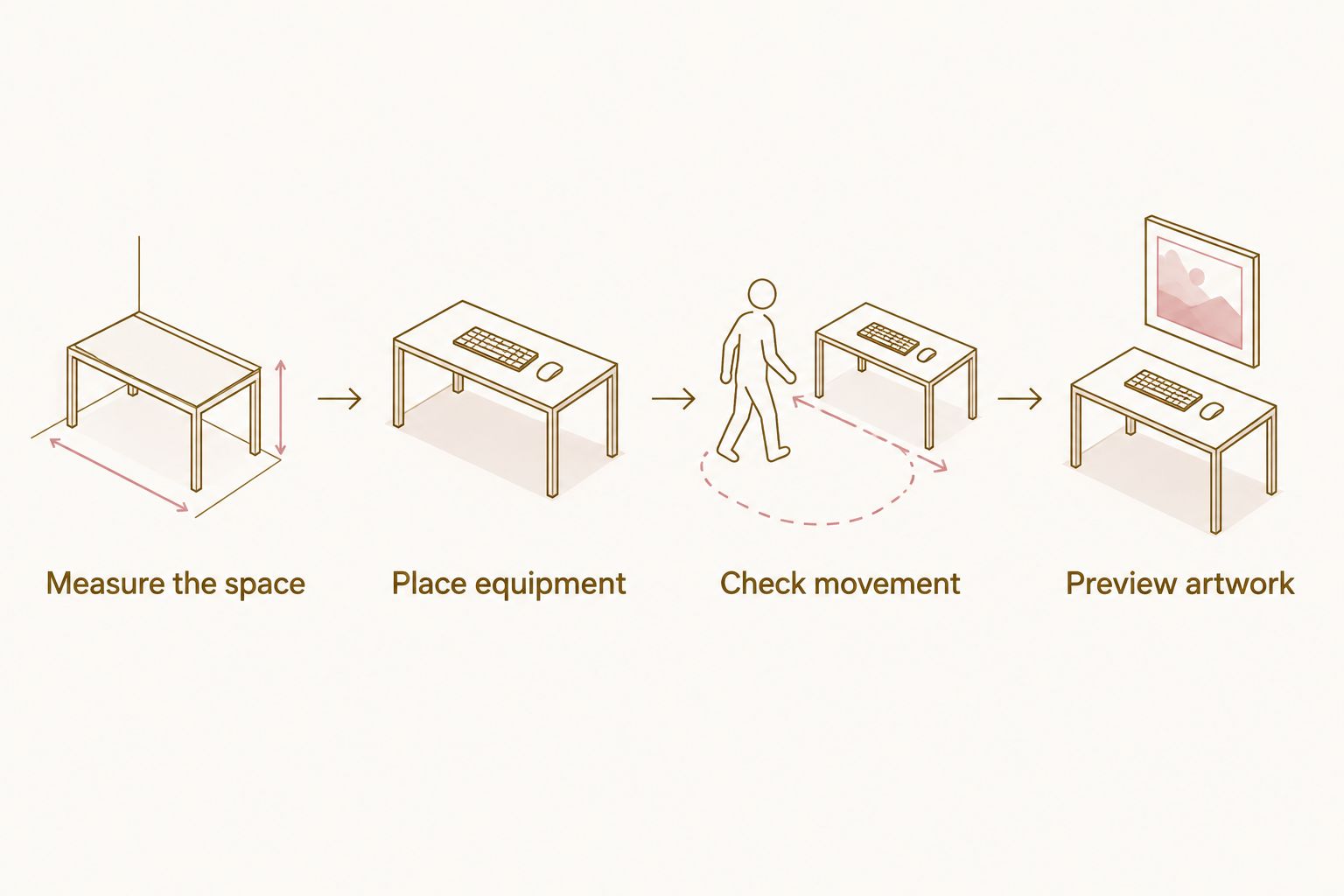
Do not transfer dimensions between unrelated photo products. Personalthrows offers a Custom 6-inch x 6-inch Easel Back Canvas and a Custom 8-inch x 10-inch Easel Back Canvas; those dimensions describe display pieces, not desk-mat sizes.
For a wider work area, measure the full arrangement again rather than stretching the artwork to fill an assumed standard size. The correct mat size comes from your equipment and movement.
Start with the original image file where possible. A screenshot or an image saved from a message can contain less image detail than the original; enlarging the file does not restore detail that is absent.
For your 2026 design, treat the desk as part of the composition. A keyboard across the middle of a family portrait hides exactly the faces you wanted to enjoy.
Read the seller’s artwork requirements before uploading. Use its stated file and resolution guidance rather than applying a blanket image-size rule to every printing process.
Printed fabric takes the default slot because this guide prioritizes a personalized keyboard-and-mouse workspace. Smooth synthetic leather, engraved cork, and clear photo-insert constructions each serve a different priority: cleanup, texture, or replaceable pictures.
The ranking uses surface, backing, footprint, construction, artwork compatibility, and care requirements. It does not assign test scores or claim that every product using a material performs identically.
Choose printed fabric with an explicitly stated nonslip backing if you are undecided. Check its dimensions and cleaning instructions, then build the design around your equipment.
Choose smooth synthetic leather for a wipeable surface, engraved cork for simple natural-texture personalization, or a clear photo-insert mat for changing pictures. For a gift in 2026, ask about the recipient’s desk and mouse setup before choosing solely from a photograph.
A separate photo display is the better choice when the memory matters more than the working surface. It keeps the picture visible without asking the image placement to accommodate a keyboard.
What are the best custom desk mats for a home office?
Printed fabric custom desk mats with an explicitly stated nonslip backing are the default choice for a keyboard-and-mouse workspace. Check the finished product’s dimensions, edge construction, and care instructions before choosing the artwork.
Is a fabric desk mat better than synthetic leather?
Choose fabric for a textile working surface and smooth synthetic leather when wipeable care is your priority. Check mouse suitability and cleaning directions for the specific finished mat rather than relying on the material name alone.
How do I choose the right desk mat size?
Measure the area occupied by your keyboard and normal mouse movement, then check the space remaining around stands and cable openings. Match those measurements to the seller’s stated dimensions.
Can I put a family photograph on a custom desk mat?
Choose a photo-printable construction or a clear photo-insert mat to display a family photograph. Position faces away from the areas your keyboard and other equipment will cover.
Are custom desk mats machine washable?
Machine washing is appropriate only when the specific desk mat’s care instructions allow it. A fabric top does not establish whether its backing, edge finish, and printed design tolerate machine washing.
Will every mouse work on a clear desk mat?
Do not assume every mouse works on a clear desk mat. Confirm compatibility for the particular mouse and surface, or use a separate mouse pad.
Should I choose a photo desk mat or a separate photo gift?
Choose a desk mat when you need a personalized working surface; choose a separate photo gift when keeping the picture visible matters more. Personalthrows offers custom photo gifts and home decor for the second purpose.
Before ordering, place a paper copy of your design beneath your keyboard. Sit down as if you are starting work and check what remains visible.
If the keyboard hides the most precious part of the picture, change the layout, not the memory. A treasured photograph deserves a position where you can actually enjoy it.

